












Roobet App for Mobile Gambling in Canada
What could be better than playing at an online casino through a convenient and well-thought-out website? Playing it on your smartphone. The Roobet app will be a lifesaver for those Canadian users who enjoy playing slots on the go or who simply prefer using their fingers instead of a mouse. Our mobile version has its own features and is not a full-fledged application that needs to be downloaded. Learn more about our mobile offering!
How to Begin Using the Roobet Casino App
We don’t provide our app via APK downloads, but we offer a much more efficient and convenient version. Roobet mobile operates via a mobile browser, which means that you can access our website via your phone just as easily as you would on your computer. But if you wish to gain faster access to our website, then you may opt for the PWA version.
For Android phones
Installing the PWA version on Android is much easier than downloading hundreds of megabytes. Just follow the instructions:
- Open Chrome on your Android device and go to the official Roobet website.
- Tap the three-dot menu in the upper right corner. Select “Add to Home Screen”.
- A pop-up window will appear – click “Install” or “Add”.
- An icon will appear on the home screen. When you click on it, Roobet will open in a separate window, just like in a regular app.
For iPhone
You can’t download apps from outside the App Store on iOS, but PWAs are allowed on iPhones. The installation process is the same as on Android:
- Open Safari on your iPhone or iPad and go to the Roobet website.
- Tap the “Share” icon at the bottom of the screen – it looks like a square with an arrow pointing up.
- Scroll down and select “Add to the Home Screen”.
- Change the shortcut name if you want, then click “Add” in the top right corner.
The Roobet icon will appear on the home screen. When clicked, the site will open in full-screen mode, without any browser tabs or address bar.
You don’t need a high-end smartphone to use it, as it is a progressive web app. If the device you have connects to the internet, it will be able to support the Roobet mobile platform. To enjoy the best performance, we would recommend you use an Android OS version that is equal to or higher than 8.0, paired with either the Chrome or Safari browser on a version of iOS equal to or higher than 12.0. All that you need is an internet connection, either Wi-Fi or 4G/5G.

How to Use Roobet Mobile App
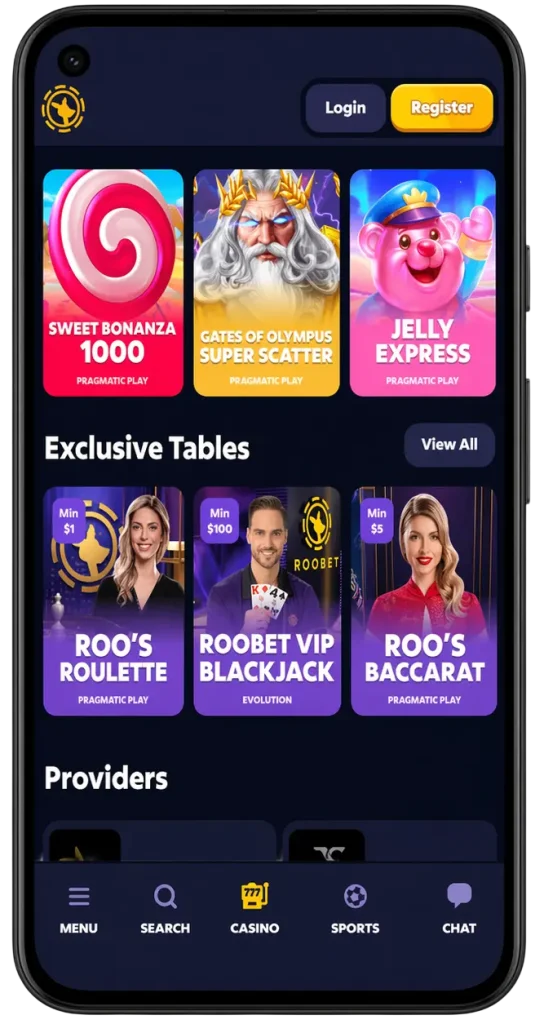
The main menu provides convenient access to all essential features. In the Casino section, you can choose to play slots, table games, live dealer games, and our exclusive Roobet Originals collection. In the Sportsbook section, you will find access to the sports betting shop as well as to all kinds of sporting events.
Promotions are displayed in the dedicated Promo section, and include all current rakeback deals, tournaments, weekly giveaways, and promo codes you have. Lastly, the Profile page allows you to deposit money, withdraw funds, verify your account and manage your settings. It is fast and convenient to switch between sections, and the search bar is available to search for games by title or filter by developer.
Registration and Deposit Process
The process of registering and making a deposit to get started on Roobet Mobile is exactly the same as on a computer. You don’t need a separate account or any other actions.
Account Creation
The registration process using a mobile device does not differ at all from the PC one. You have to click the “Register” button and insert only three pieces of information: login, password, and e-mail. Moreover, you may use either Google or the Metamask wallet to log in and thus make the registration even faster.
Depositing
After signing in, you can go to your wallet icon or “Deposit” tab. We will offer you two ways to increase your funds:
The first one involves making a top-up using the cryptocurrency. Choose BTC, ETH, LTC, USDT, DOGE, or any other coin available in our casino. You will simply need to copy the address of your wallet and transfer the coins from your third-party wallet into our wallet. It happens instantly.
The second one – Interac e-transfer, designed for fans of fiat currency deposits – involves inserting the transfer sum and following the further steps on how to carry out the transaction using your bank app. In most cases, deposits via Interac happen instantly, while withdrawals can take from 1 to 3 business days.
How to withdraw money
In order to withdraw the money, you should choose the way of withdrawing and insert the sum needed. Cryptocurrency withdrawals usually take between 15 minutes and an hour. As to withdrawing money using Interac, it takes from 24 to 48 hours. In addition, please keep in mind that if you did not pass all the levels of verification, we may require carrying out the KYC process before allowing you to withdraw funds.
Roo bet Mobile Bonuses
The Roobet casino app completely repeats the bonus system of its computer version, and it looks like this:
- The main reward that comes from our rakeback programme is when you receive a part of your wagered funds back immediately, every day, week, and month.
- The CAD 136,942 Weekly Raffle lets you be chanced of getting some prizes. Every CAD 13,694 wagered will grant you one lottery ticket.
- The Drop and Win prize from Pragmatic Play offers more than CAD 34,235,500 total rewards, including drops and others.
- Promocodes, which appear through the live streaming and social networks, provide free spins, cashback, etc.
- VIP members get special club access upon an invitation only.
Advantages of Using the Roobet App
You might wonder: why not just build a native app? It’s a fair question. But for a crypto casino, PWAs have real advantages.
- No storage space
- You never have to manually Roobet app download updates
- Works on all devices
- You’re not downloading an APK from an unknown source
But there are also nuances that may seem to some to be weaknesses of the PWA.
- No push notifications
- Limited offline functionality, you need an internet connection to play
Safety and Fairness
Using Roobet Casino via mobile does not imply a compromise in terms of your safety. All connections made between your mobile device and our server are protected by 256-bit SSL encryption. Additionally, Roobet allows for 2FA. It means that once the option is turned on through your settings, logging into the platform will require entering the code received from the authenticator application. In other words, having your password alone will be insufficient for logging in.